Introduction
imported>PvME corpus import Attributed pinned PvME snapshot 074a9438f79d10fba75735791be0030734db8b5e; CC BY-NC-SA 4.0 |
Update source attribution; preserve PvME guide content |
||
| (One intermediate revision by the same user not shown) | |||
| Line 1: | Line 1: | ||
__NOTOC__ | |||
<div class="pvme-exact-guide"> | |||
<div class="pvme-source-section"> | |||
<h2 id="introduction"><ins><nowiki>Introduction</nowiki></ins></h2> | <h2 id="introduction"><ins><nowiki>Introduction</nowiki></ins></h2> | ||
<nowiki> | <nowiki> | ||
</nowiki><p><nowiki>⬥ Some guides require sharing an action bar to go alongside them, but it can be difficult to make in-game if you don't have spare action bars, or if you don't have the required abilities to do so unlocked.</nowiki></p> | </nowiki> | ||
<p class="pvme-source-line"><nowiki>⬥ Some guides require sharing an action bar to go alongside them, but it can be difficult to make in-game if you don't have spare action bars, or if you don't have the required abilities to do so unlocked.</nowiki></p> | |||
<nowiki> | <nowiki> | ||
</nowiki><p><nowiki>⬥ A couple of tools have been developed that make this process easier.</nowiki></p> | </nowiki> | ||
<p class="pvme-source-line"><nowiki>⬥ A couple of tools have been developed that make this process easier.</nowiki></p> | |||
<nowiki> | <nowiki> | ||
</nowiki><p><nowiki></nowiki></p> | </nowiki> | ||
<p class="pvme-source-line pvme-source-spacer"><nowiki></nowiki></p> | |||
<nowiki> | <nowiki> | ||
</nowiki><h2 id="ability-bar-builder"><ins><nowiki>Ability Bar Builder</nowiki></ins></h2> | </nowiki> | ||
</div> | |||
<div class="pvme-source-section"> | |||
<h2 id="ability-bar-builder"><ins><nowiki>Ability Bar Builder</nowiki></ins></h2> | |||
<nowiki> | <nowiki> | ||
</nowiki><p><nowiki>⬥ Try it here: </nowiki><strong>[https://pvme.github.io/ability-bar-builder/ <nowiki>https://pvme.github.io/ability-bar-builder/</nowiki>]</strong></p> | </nowiki> | ||
<p class="pvme-source-line"><nowiki>⬥ Try it here: </nowiki><strong>[https://pvme.github.io/ability-bar-builder/ <nowiki>https://pvme.github.io/ability-bar-builder/</nowiki>]</strong></p> | |||
<nowiki> | <nowiki> | ||
</nowiki><p> | </nowiki> | ||
⬥ This tool (created by | <p class="pvme-source-line"><pvme-image src="https://img.pvme.io/images/H3MDTbTKzK.png" alt="" title="" kind="media" /><nowiki> | ||
⬥ This tool (created by @Unknown user) allows you to quickly create custom revolution bars that you can then take screenshots of, or directly export as </nowiki><code><nowiki>.png</nowiki></code><nowiki>.</nowiki></p> | |||
<nowiki> | <nowiki> | ||
</nowiki><p><nowiki> • You can then send it to </nowiki> | </nowiki> | ||
<p class="pvme-source-line pvme-source-detail"><nowiki> • You can then send it to </nowiki><span><nowiki>#guide-media-upload-and-request</nowiki></span><nowiki> to get a image link to use in guides generated.</nowiki></p> | |||
<nowiki> | <nowiki> | ||
</nowiki><p><nowiki>⬥ To use it, </nowiki><strong><nowiki>simply click on an ability bar slot and choose an ability to go there</nowiki></strong><nowiki>.</nowiki></p> | </nowiki> | ||
<p class="pvme-source-line"><nowiki>⬥ To use it, </nowiki><strong><nowiki>simply click on an ability bar slot and choose an ability to go there</nowiki></strong><nowiki>.</nowiki></p> | |||
<nowiki> | <nowiki> | ||
</nowiki><p><nowiki>⬥ You can use the toggles above to change the bar length, toggle the yellow outline on/off, and remove the white number icons.</nowiki></p> | </nowiki> | ||
<p class="pvme-source-line"><nowiki>⬥ You can use the toggles above to change the bar length, toggle the yellow outline on/off, and remove the white number icons.</nowiki></p> | |||
<nowiki> | <nowiki> | ||
</nowiki><p><nowiki></nowiki></p> | </nowiki> | ||
<p class="pvme-source-line pvme-source-spacer"><nowiki></nowiki></p> | |||
<nowiki> | <nowiki> | ||
</nowiki><h2 id="revo-bar-tool"><ins><nowiki>Revo Bar Tool</nowiki></ins></h2> | </nowiki> | ||
</div> | |||
<div class="pvme-source-section"> | |||
<h2 id="revo-bar-tool"><ins><nowiki>Revo Bar Tool</nowiki></ins></h2> | |||
<nowiki> | <nowiki> | ||
</nowiki><p><strong><nowiki>Note</nowiki></strong><nowiki>: This tool may sometimes be down (towards the end of a month), due to excessive traffic.</nowiki></p> | </nowiki> | ||
<p class="pvme-source-line"><strong><nowiki>Note</nowiki></strong><nowiki>: This tool may sometimes be down (towards the end of a month), due to excessive traffic.</nowiki></p> | |||
<nowiki> | <nowiki> | ||
</nowiki><p><nowiki></nowiki></p> | </nowiki> | ||
<p class="pvme-source-line pvme-source-spacer"><nowiki></nowiki></p> | |||
<nowiki> | <nowiki> | ||
</nowiki><p><nowiki>⬥ Try it here: </nowiki><strong>[https://revocalc.fly.dev/ <nowiki>https://revocalc.fly.dev/</nowiki>]</strong></p> | </nowiki> | ||
<p class="pvme-source-line"><nowiki>⬥ Try it here: </nowiki><strong>[https://revocalc.fly.dev/ <nowiki>https://revocalc.fly.dev/</nowiki>]</strong></p> | |||
<nowiki> | <nowiki> | ||
</nowiki><p> | </nowiki> | ||
⬥ This tool was created by | <p class="pvme-source-line"><pvme-image src="https://img.pvme.io/images/50aZhme.png" alt="" title="" kind="media" /><nowiki> | ||
⬥ This tool was created by @Unknown user and allows you to create custom revolution bars, similar to the </nowiki><strong><nowiki>Ability Bar Builder.</nowiki></strong></p> | |||
<nowiki> | <nowiki> | ||
</nowiki><p><nowiki>⬥ To use it, </nowiki><strong><nowiki>drag and drop abilities from the menus above into the bar</nowiki></strong><nowiki>. To clear a slot on the bar, simply drag out the ability from it.</nowiki></p> | </nowiki> | ||
<p class="pvme-source-line"><nowiki>⬥ To use it, </nowiki><strong><nowiki>drag and drop abilities from the menus above into the bar</nowiki></strong><nowiki>. To clear a slot on the bar, simply drag out the ability from it.</nowiki></p> | |||
<nowiki> | <nowiki> | ||
</nowiki><p><nowiki>⬥ You can also simulate using the revolution bar in combat, to compare its long-term sustained DPS with other bars.</nowiki></p> | </nowiki> | ||
<p class="pvme-source-line"><nowiki>⬥ You can also simulate using the revolution bar in combat, to compare its long-term sustained DPS with other bars.</nowiki></p> | |||
<nowiki> | <nowiki> | ||
</nowiki><p><nowiki></nowiki></p> | </nowiki> | ||
<p class="pvme-source-line pvme-source-spacer"><nowiki></nowiki></p> | |||
<nowiki> | <nowiki> | ||
</nowiki> | </nowiki> | ||
</div> | |||
</div> | |||
<div class="pvme-source-attribution">[https://pvme.io/pvme-guides/editor-resources/editor-references/ability-bar-builder/ PvME source] · PvME contributors · [https://creativecommons.org/licenses/by-nc-sa/4.0/ CC BY-NC-SA 4.0]. | |||
</div> | |||
Latest revision as of 02:35, 16 November 2026
Introduction
⬥ Some guides require sharing an action bar to go alongside them, but it can be difficult to make in-game if you don't have spare action bars, or if you don't have the required abilities to do so unlocked.
⬥ A couple of tools have been developed that make this process easier.
Ability Bar Builder
⬥ Try it here: https://pvme.github.io/ability-bar-builder/
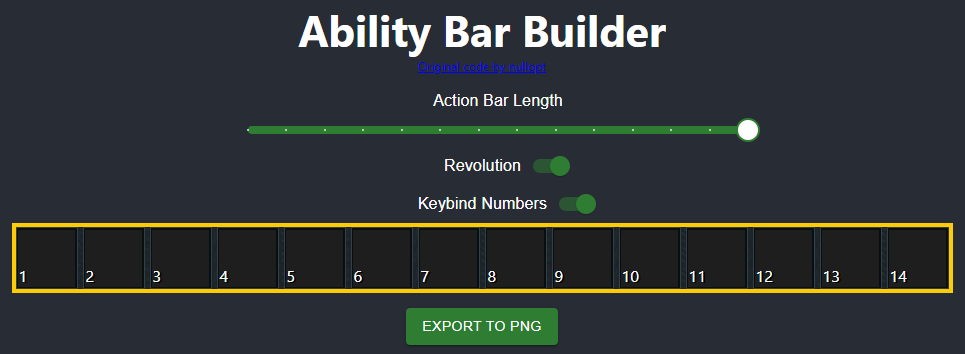 ⬥ This tool (created by @Unknown user) allows you to quickly create custom revolution bars that you can then take screenshots of, or directly export as
.png.
• You can then send it to #guide-media-upload-and-request to get a image link to use in guides generated.
⬥ To use it, simply click on an ability bar slot and choose an ability to go there.
⬥ You can use the toggles above to change the bar length, toggle the yellow outline on/off, and remove the white number icons.
Revo Bar Tool
Note: This tool may sometimes be down (towards the end of a month), due to excessive traffic.
⬥ Try it here: https://revocalc.fly.dev/
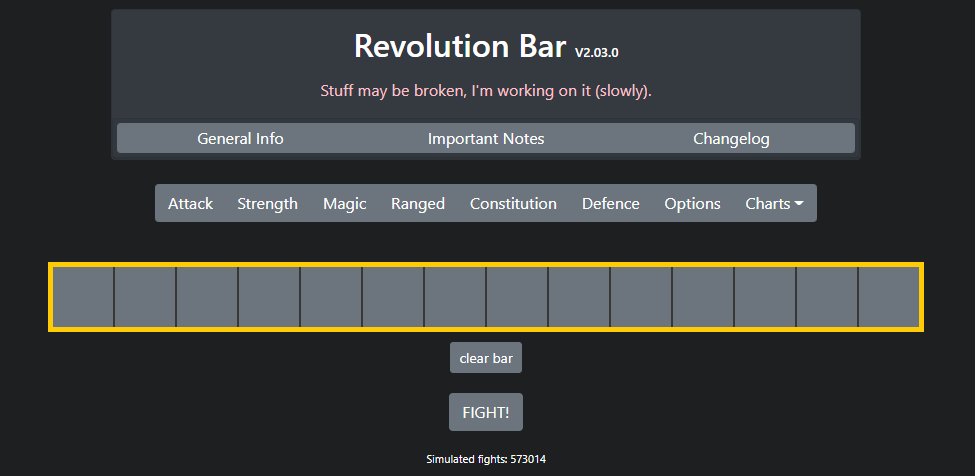 ⬥ This tool was created by @Unknown user and allows you to create custom revolution bars, similar to the Ability Bar Builder.
⬥ To use it, drag and drop abilities from the menus above into the bar. To clear a slot on the bar, simply drag out the ability from it.
⬥ You can also simulate using the revolution bar in combat, to compare its long-term sustained DPS with other bars.