Banner Builder
imported>PvME corpus import Attributed pinned PvME snapshot 074a9438f79d10fba75735791be0030734db8b5e; CC BY-NC-SA 4.0 |
AI-assisted additive formatting; current PvME source words, order and media preserved |
||
| Line 1: | Line 1: | ||
__NOTOC__ | |||
<div class="pvme-exact-guide"> | |||
< | <h1 id="banner-builder" class="pvme-source-title"><ins><nowiki>Banner Builder</nowiki></ins></h1> | ||
<nowiki> | <nowiki> | ||
</nowiki><p><nowiki> | </nowiki> | ||
<p class="pvme-source-line"><nowiki>⬥ A banner summarising key information about a monster should be used atop every guide (or section, if there are multiple like an elite dungeon).</nowiki></p> | |||
<nowiki> | <nowiki> | ||
</nowiki><p | </nowiki> | ||
<p class="pvme-source-line pvme-source-spacer"><nowiki></nowiki></p> | |||
<nowiki> | <nowiki> | ||
</nowiki><p><nowiki> | </nowiki> | ||
<p class="pvme-source-line"><nowiki>⬥ Please note, all banners are stored in the </nowiki>[https://docs.google.com/spreadsheets/d/1OGM9MBUG2bQVbHxlm86Xfs60soFcjINSOrPv1WL3Vgw/edit#gid=1657882095 <nowiki>PvME Spreadsheet</nowiki>]<nowiki>. Check here before creating one, and if you create one let us know in </nowiki><span><nowiki>#editors-chat</nowiki></span><nowiki> so it can be added to the sheet.</nowiki></p> | |||
<nowiki> | <nowiki> | ||
</nowiki><p | </nowiki> | ||
<p class="pvme-source-line pvme-source-spacer"><nowiki></nowiki></p> | |||
<nowiki> | <nowiki> | ||
</nowiki><p><nowiki> | </nowiki> | ||
<p class="pvme-source-line"><nowiki>⬥ Head to </nowiki>[https://pvme.io/banner-builder/ <nowiki>https://pvme.io/banner-builder/</nowiki>]<nowiki> to start creating your first banner, in your browser, with no design knowledge required!</nowiki></p> | |||
<nowiki> | <nowiki> | ||
</nowiki><p><nowiki> | </nowiki> | ||
<p class="pvme-source-line pvme-source-spacer"><nowiki></nowiki></p> | |||
<nowiki> | <nowiki> | ||
</nowiki><p><nowiki> | </nowiki> | ||
<p class="pvme-source-line"><nowiki>⬥ If you need help, however big or small please ask for help in </nowiki><span><nowiki>#editors-chat</nowiki></span><nowiki>.</nowiki></p> | |||
<nowiki> | <nowiki> | ||
</nowiki><p><nowiki> | </nowiki> | ||
<p class="pvme-source-line pvme-source-spacer"><nowiki></nowiki></p> | |||
<nowiki> | <nowiki> | ||
</nowiki><p><nowiki> | </nowiki> | ||
<p class="pvme-source-line"><nowiki>⬥ Key information about banners:</nowiki></p> | |||
<nowiki> | <nowiki> | ||
</nowiki><p><nowiki> • They | </nowiki> | ||
<p class="pvme-source-line pvme-source-detail"><nowiki> • They are sized with the ratio 12w x 5h and a minimum of 300px in height</nowiki></p> | |||
<nowiki> | <nowiki> | ||
</nowiki><p><nowiki> | </nowiki> | ||
<p class="pvme-source-line pvme-source-detail"><nowiki> • They have the following components:</nowiki></p> | |||
<nowiki> | <nowiki> | ||
</nowiki><p><nowiki> ⬩ | </nowiki> | ||
<p class="pvme-source-line pvme-source-detail"><nowiki> ⬩ A blurry background representing the arena/area the monster lives in</nowiki></p> | |||
<nowiki> | <nowiki> | ||
</nowiki><p><nowiki> ⬩ The monster | </nowiki> | ||
<p class="pvme-source-line pvme-source-detail"><nowiki> ⬩ The name picture of the monster</nowiki></p> | |||
<nowiki> | <nowiki> | ||
</nowiki><p><nowiki> ⬩ | </nowiki> | ||
<p class="pvme-source-line pvme-source-detail"><nowiki> ⬩ The monster's size (2x2, 5x5 etc)</nowiki></p> | |||
<nowiki> | <nowiki> | ||
</nowiki><p><nowiki> ⬩ | </nowiki> | ||
<p class="pvme-source-line pvme-source-detail"><nowiki> ⬩ Whether poison can be used</nowiki></p> | |||
<nowiki> | <nowiki> | ||
</nowiki><p><nowiki> ⬩ | </nowiki> | ||
<p class="pvme-source-line pvme-source-detail"><nowiki> ⬩ Which weapon the monster is vulnerable to</nowiki></p> | |||
<nowiki> | <nowiki> | ||
</nowiki><p><nowiki> | </nowiki> | ||
<p class="pvme-source-line pvme-source-detail"><nowiki> ⬩ Whether familiar damage can be used</nowiki></p> | |||
<nowiki> | <nowiki> | ||
</nowiki>< | </nowiki> | ||
<p class="pvme-source-line pvme-source-spacer"><nowiki></nowiki></p> | |||
<nowiki> | <nowiki> | ||
</nowiki>< | </nowiki> | ||
<div class="pvme-source-section"> | |||
<h2 id="instructions-for-manual-banner-creation"><ins><nowiki>Instructions for </nowiki><em><nowiki>manual</nowiki></em><nowiki> banner creation</nowiki></ins></h2> | |||
<nowiki> | <nowiki> | ||
</nowiki><p><nowiki> | </nowiki> | ||
<p class="pvme-source-line"><nowiki>⬥ In some situations (for example, the entire the entire internet falls to robots) you may need to create banners manually</nowiki></p> | |||
<nowiki> | <nowiki> | ||
</nowiki><p><nowiki> | </nowiki> | ||
<p class="pvme-source-line pvme-source-spacer"><nowiki></nowiki></p> | |||
<nowiki> | <nowiki> | ||
</nowiki><p><nowiki> | </nowiki> | ||
<p class="pvme-source-line"><nowiki>⬥ Manual creation will work in any app that supports transparency, for example:</nowiki></p> | |||
<nowiki> | <nowiki> | ||
</nowiki><p><nowiki> • | </nowiki> | ||
<p class="pvme-source-line pvme-source-detail"><nowiki> • Photoshop</nowiki></p> | |||
<nowiki> | <nowiki> | ||
</nowiki><p><nowiki> • | </nowiki> | ||
<p class="pvme-source-line pvme-source-detail"><nowiki> • Gravit.io</nowiki></p> | |||
<nowiki> | <nowiki> | ||
</nowiki><p><nowiki> • | </nowiki> | ||
<p class="pvme-source-line pvme-source-detail"><nowiki> • PowerPoint</nowiki></p> | |||
<nowiki> | <nowiki> | ||
</nowiki>< | </nowiki> | ||
<p class="pvme-source-line pvme-source-detail"><nowiki> • Paint.net</nowiki></p> | |||
<nowiki> | <nowiki> | ||
</nowiki><ol><nowiki> | </nowiki> | ||
<div class="pvme-source-mechanic"> | |||
<h3 id="step-1-create-a-blurry-background-and-add-the-boxes"><nowiki>Step 1: Create a blurry background and add the boxes</nowiki></h3> | |||
<nowiki> | |||
</nowiki> | |||
<ol><nowiki> | |||
</nowiki><li><nowiki>Save </nowiki>[https://img.pvme.io/images/x5oFrjy7Kx.png <nowiki>this template file</nowiki>]<nowiki> to your machine and open it in your chosen editor</nowiki></li><nowiki> | </nowiki><li><nowiki>Save </nowiki>[https://img.pvme.io/images/x5oFrjy7Kx.png <nowiki>this template file</nowiki>]<nowiki> to your machine and open it in your chosen editor</nowiki></li><nowiki> | ||
</nowiki></ol> | </nowiki></ol> | ||
<nowiki> | <nowiki> | ||
</nowiki><p><nowiki> a. </nowiki><em><nowiki>Note: If using PowerPoint, unlock aspect ratio to fix pixel dimensions, then type the pixel value into the boxes that say "cm/inch" (e.g. "1440px")</nowiki></em></p> | </nowiki> | ||
<p class="pvme-source-line"><nowiki> a. </nowiki><em><nowiki>Note: If using PowerPoint, unlock aspect ratio to fix pixel dimensions, then type the pixel value into the boxes that say "cm/inch" (e.g. "1440px")</nowiki></em></p> | |||
<nowiki> | <nowiki> | ||
</nowiki><ol><nowiki> | </nowiki> | ||
<ol><nowiki> | |||
</nowiki><li><nowiki>In-game, visit the monster's area and use the Freecam or </nowiki>[https://runescape.wiki/w/Orb_of_oculus <nowiki>Orb of oculus</nowiki>]<nowiki> to find a nice backdrop for your banner</nowiki></li><nowiki> | </nowiki><li><nowiki>In-game, visit the monster's area and use the Freecam or </nowiki>[https://runescape.wiki/w/Orb_of_oculus <nowiki>Orb of oculus</nowiki>]<nowiki> to find a nice backdrop for your banner</nowiki></li><nowiki> | ||
</nowiki></ol> | </nowiki></ol> | ||
<nowiki> | <nowiki> | ||
</nowiki><p><nowiki> a. </nowiki><em><nowiki>Note: A darker environment </nowiki>[https://runescape.wiki/w/Skyboxes_and_filters <nowiki>skybox</nowiki>]<nowiki> will usually make the banner look cleaner - experiment!</nowiki></em></p> | </nowiki> | ||
<p class="pvme-source-line"><nowiki> a. </nowiki><em><nowiki>Note: A darker environment </nowiki>[https://runescape.wiki/w/Skyboxes_and_filters <nowiki>skybox</nowiki>]<nowiki> will usually make the banner look cleaner - experiment!</nowiki></em></p> | |||
<nowiki> | <nowiki> | ||
</nowiki><ol><nowiki> | </nowiki> | ||
<ol><nowiki> | |||
</nowiki><li><nowiki> | </nowiki><li><nowiki> | ||
</nowiki><p><nowiki>Screenshot the chosen area, and copy the image into your editor</nowiki></p> | </nowiki><p class="pvme-source-line"><nowiki>Screenshot the chosen area, and copy the image into your editor</nowiki></p><nowiki> | ||
<nowiki> | |||
</nowiki></li><nowiki> | </nowiki></li><nowiki> | ||
</nowiki><li><nowiki> | </nowiki><li><nowiki> | ||
</nowiki><p><nowiki>Re-order your objects so the background is behind/under the template you started with</nowiki></p> | </nowiki><p class="pvme-source-line"><nowiki>Re-order your objects so the background is behind/under the template you started with</nowiki></p><nowiki> | ||
<nowiki> | |||
</nowiki></li><nowiki> | </nowiki></li><nowiki> | ||
</nowiki><li><nowiki> | </nowiki><li><nowiki> | ||
</nowiki><p><nowiki>Crop the background image to the same size as the template</nowiki></p> | </nowiki><p class="pvme-source-line"><nowiki>Crop the background image to the same size as the template</nowiki></p><nowiki> | ||
<nowiki> | |||
</nowiki></li><nowiki> | </nowiki></li><nowiki> | ||
</nowiki><li><nowiki> | </nowiki><li><nowiki> | ||
</nowiki><p><nowiki>Add a strong blur effect to the background image so you can still see the general vibe of the area but not the details</nowiki></p> | </nowiki><p class="pvme-source-line"><nowiki>Add a strong blur effect to the background image so you can still see the general vibe of the area but not the details</nowiki></p><nowiki> | ||
<nowiki> | |||
</nowiki></li><nowiki> | </nowiki></li><nowiki> | ||
</nowiki></ol> | </nowiki></ol> | ||
<nowiki> | <nowiki> | ||
</nowiki><p><nowiki> a. </nowiki><em><nowiki>Note: If using PowerPoint, right-click image → Picture corrections → Sharpness (-70 to -90%)</nowiki></em></p> | </nowiki> | ||
<p class="pvme-source-line pvme-source-sequence"><nowiki> a. </nowiki><em><nowiki>Note: If using PowerPoint, right-click image → Picture corrections → Sharpness (-70 to -90%)</nowiki></em></p> | |||
<nowiki> | <nowiki> | ||
</nowiki><p><nowiki></nowiki></p> | </nowiki> | ||
<p class="pvme-source-line pvme-source-spacer"><nowiki></nowiki></p> | |||
<nowiki> | <nowiki> | ||
</nowiki><p><strong><nowiki>Good job! You should now have a banner that looks something like below:</nowiki></strong></p> | </nowiki> | ||
<p class="pvme-source-line"><strong><nowiki>Good job! You should now have a banner that looks something like below:</nowiki></strong></p> | |||
<nowiki> | <nowiki> | ||
</nowiki><p> | </nowiki> | ||
<p class="pvme-source-line"><pvme-image src="https://img.pvme.io/images/wMPYOsxghY.png" alt="" title="" kind="media" /><nowiki> | |||
</nowiki></p> | </nowiki></p> | ||
<nowiki> | <nowiki> | ||
</nowiki><h3 id="step-2-add-the-monsters-name-and-image"><nowiki>Step 2: Add the monster's name and image</nowiki></h3> | </nowiki> | ||
</div> | |||
<div class="pvme-source-mechanic"> | |||
<h3 id="step-2-add-the-monsters-name-and-image"><nowiki>Step 2: Add the monster's name and image</nowiki></h3> | |||
<nowiki> | <nowiki> | ||
</nowiki><ol><nowiki> | </nowiki> | ||
<ol><nowiki> | |||
</nowiki><li><nowiki> | </nowiki><li><nowiki> | ||
</nowiki><p>[https://fonts.google.com/specimen/Russo+One <nowiki>Download the Russo One font</nowiki>]<nowiki> and install it to your machine</nowiki></p> | </nowiki><p class="pvme-source-line">[https://fonts.google.com/specimen/Russo+One <nowiki>Download the Russo One font</nowiki>]<nowiki> and install it to your machine</nowiki></p><nowiki> | ||
<nowiki> | |||
</nowiki></li><nowiki> | </nowiki></li><nowiki> | ||
</nowiki><li><nowiki> | </nowiki><li><nowiki> | ||
</nowiki><p><nowiki>Open and copy </nowiki>[https://img.pvme.io/images/av8OFsrGoq.png <nowiki>this guide layer</nowiki>]<nowiki> into your editor</nowiki></p> | </nowiki><p class="pvme-source-line"><nowiki>Open and copy </nowiki>[https://img.pvme.io/images/av8OFsrGoq.png <nowiki>this guide layer</nowiki>]<nowiki> into your editor</nowiki></p><nowiki> | ||
<nowiki> | |||
</nowiki></li><nowiki> | </nowiki></li><nowiki> | ||
</nowiki><li><nowiki> | </nowiki><li><nowiki> | ||
</nowiki><p><nowiki>Staying within the red lines, add a text box (start with font size 102px) and enter the boss' name</nowiki></p> | </nowiki><p class="pvme-source-line"><nowiki>Staying within the red lines, add a text box (start with font size 102px) and enter the boss' name</nowiki></p><nowiki> | ||
<nowiki> | |||
</nowiki></li><nowiki> | </nowiki></li><nowiki> | ||
</nowiki></ol> | </nowiki></ol> | ||
<nowiki> | <nowiki> | ||
</nowiki><p><nowiki> a. </nowiki><em><nowiki>Note: If the monster has a long name, reducing the font-size is okay as long as it stays within the red lines</nowiki></em></p> | </nowiki> | ||
<p class="pvme-source-line"><nowiki> a. </nowiki><em><nowiki>Note: If the monster has a long name, reducing the font-size is okay as long as it stays within the red lines</nowiki></em></p> | |||
<nowiki> | <nowiki> | ||
</nowiki><p><nowiki> b. </nowiki><em><nowiki>Note: If using PowerPoint, you will need to eyeball the font-size rather than use pixel font-sizes</nowiki></em></p> | </nowiki> | ||
<p class="pvme-source-line"><nowiki> b. </nowiki><em><nowiki>Note: If using PowerPoint, you will need to eyeball the font-size rather than use pixel font-sizes</nowiki></em></p> | |||
<nowiki> | <nowiki> | ||
</nowiki><ol><nowiki> | </nowiki> | ||
<ol><nowiki> | |||
</nowiki><li><nowiki> | </nowiki><li><nowiki> | ||
</nowiki><p><nowiki>Centre the boss' name horizontally in the middle of the white boxes (it should be off-centre to the left)</nowiki></p> | </nowiki><p class="pvme-source-line"><nowiki>Centre the boss' name horizontally in the middle of the white boxes (it should be off-centre to the left)</nowiki></p><nowiki> | ||
<nowiki> | |||
</nowiki></li><nowiki> | </nowiki></li><nowiki> | ||
</nowiki><li><nowiki> | </nowiki><li><nowiki> | ||
</nowiki><p><nowiki>Get the image of the monster from the Runescape Wiki:</nowiki></p> | </nowiki><p class="pvme-source-line"><nowiki>Get the image of the monster from the Runescape Wiki:</nowiki></p><nowiki> | ||
<nowiki> | |||
</nowiki></li><nowiki> | </nowiki></li><nowiki> | ||
</nowiki></ol> | </nowiki></ol> | ||
<nowiki> | <nowiki> | ||
</nowiki><p><nowiki> a. Open the Runescape Wiki, navigate to the monster's page</nowiki></p> | </nowiki> | ||
<p class="pvme-source-line"><nowiki> a. Open the Runescape Wiki, navigate to the monster's page</nowiki></p> | |||
<nowiki> | <nowiki> | ||
</nowiki><p><nowiki> b. Click on the main image - it should maximise the image file</nowiki></p> | </nowiki> | ||
<p class="pvme-source-line"><nowiki> b. Click on the main image - it should maximise the image file</nowiki></p> | |||
<nowiki> | <nowiki> | ||
</nowiki><p><nowiki> c. Right-click download this image</nowiki></p> | </nowiki> | ||
<p class="pvme-source-line"><nowiki> c. Right-click download this image</nowiki></p> | |||
<nowiki> | <nowiki> | ||
</nowiki><p><nowiki> d. Import it into your editor (note: this is an important step in some editors, as copying sometimes loses the transparent background)</nowiki></p> | </nowiki> | ||
<p class="pvme-source-line"><nowiki> d. Import it into your editor (note: this is an important step in some editors, as copying sometimes loses the transparent background)</nowiki></p> | |||
<nowiki> | <nowiki> | ||
</nowiki><ol><nowiki> | </nowiki> | ||
<ol><nowiki> | |||
</nowiki><li><nowiki> | </nowiki><li><nowiki> | ||
</nowiki><p><nowiki>Move the monster's image to the empty space on the right, and resize as appropriate</nowiki></p> | </nowiki><p class="pvme-source-line"><nowiki>Move the monster's image to the empty space on the right, and resize as appropriate</nowiki></p><nowiki> | ||
<nowiki> | |||
</nowiki></li><nowiki> | </nowiki></li><nowiki> | ||
</nowiki><li><nowiki> | </nowiki><li><nowiki> | ||
</nowiki><p><nowiki>You can now safely hide or delete the red guide layer</nowiki></p> | </nowiki><p class="pvme-source-line"><nowiki>You can now safely hide or delete the red guide layer</nowiki></p><nowiki> | ||
<nowiki> | |||
</nowiki></li><nowiki> | </nowiki></li><nowiki> | ||
</nowiki></ol> | </nowiki></ol> | ||
<nowiki> | <nowiki> | ||
</nowiki><p><nowiki></nowiki></p> | </nowiki> | ||
<p class="pvme-source-line pvme-source-spacer"><nowiki></nowiki></p> | |||
<nowiki> | <nowiki> | ||
</nowiki><p><strong><nowiki>Good job! You should now have a banner that looks something like below:</nowiki></strong></p> | </nowiki> | ||
<p class="pvme-source-line"><strong><nowiki>Good job! You should now have a banner that looks something like below:</nowiki></strong></p> | |||
<nowiki> | <nowiki> | ||
</nowiki><p> | </nowiki> | ||
<p class="pvme-source-line"><pvme-image src="https://img.pvme.io/images/4DdX0AEOHn.png" alt="" title="" kind="media" /><nowiki> | |||
</nowiki></p> | </nowiki></p> | ||
<nowiki> | <nowiki> | ||
</nowiki><h3 id="step-3-add-the-summary-boxes"><nowiki>Step 3: Add the summary boxes</nowiki></h3> | </nowiki> | ||
</div> | |||
<div class="pvme-source-mechanic"> | |||
<h3 id="step-3-add-the-summary-boxes"><nowiki>Step 3: Add the summary boxes</nowiki></h3> | |||
<nowiki> | <nowiki> | ||
</nowiki><ol><nowiki> | </nowiki> | ||
<ol><nowiki> | |||
</nowiki><li><nowiki>Now comes the fiddly part! Copy in the relevant icons from the below list to the remaining white boxes, </nowiki><ins><nowiki>ensuring they are centred within their box</nowiki></ins><nowiki>.</nowiki></li><nowiki> | </nowiki><li><nowiki>Now comes the fiddly part! Copy in the relevant icons from the below list to the remaining white boxes, </nowiki><ins><nowiki>ensuring they are centred within their box</nowiki></ins><nowiki>.</nowiki></li><nowiki> | ||
</nowiki></ol> | </nowiki></ol> | ||
<nowiki> | <nowiki> | ||
</nowiki><p><nowiki> a. </nowiki><em><nowiki>Note: The only non-icon box is the bottom-left, where you will need to use the same font as before to type in the boss' size (start with font size 53px)</nowiki></em></p> | </nowiki> | ||
<p class="pvme-source-line"><nowiki> a. </nowiki><em><nowiki>Note: The only non-icon box is the bottom-left, where you will need to use the same font as before to type in the boss' size (start with font size 53px)</nowiki></em></p> | |||
<nowiki> | <nowiki> | ||
</nowiki><p><nowiki> b. </nowiki><em><nowiki>Note: You should be able find the boss' size in a table on the </nowiki>[https://runescape.wiki/w/Seren_godbow#Recommended_bosses <nowiki>Seren godbow Wiki page</nowiki>]</em></p> | </nowiki> | ||
<p class="pvme-source-line"><nowiki> b. </nowiki><em><nowiki>Note: You should be able find the boss' size in a table on the </nowiki>[https://runescape.wiki/w/Seren_godbow#Recommended_bosses <nowiki>Seren godbow Wiki page</nowiki>]</em></p> | |||
<nowiki> | <nowiki> | ||
</nowiki><p><nowiki> c. </nowiki><em><nowiki>Note: If using PowerPoint, the align tools are under "Arrange"</nowiki></em></p> | </nowiki> | ||
<p class="pvme-source-line"><nowiki> c. </nowiki><em><nowiki>Note: If using PowerPoint, the align tools are under "Arrange"</nowiki></em></p> | |||
<nowiki> | <nowiki> | ||
</nowiki><p><nowiki></nowiki></p> | </nowiki> | ||
<p class="pvme-source-line pvme-source-spacer"><nowiki></nowiki></p> | |||
<nowiki> | <nowiki> | ||
</nowiki><p><nowiki>⬥ Icons (download or copy these into the editor as required):</nowiki></p> | </nowiki> | ||
<p class="pvme-source-line"><nowiki>⬥ Icons (download or copy these into the editor as required):</nowiki></p> | |||
<nowiki> | <nowiki> | ||
</nowiki><p><nowiki> • </nowiki>[https://img.pvme.io/images/XWT3opBawS.png <nowiki>Box 3 - Inquisitor Staff</nowiki>]</p> | </nowiki> | ||
<p class="pvme-source-line pvme-source-detail"><nowiki> • </nowiki>[https://img.pvme.io/images/XWT3opBawS.png <nowiki>Box 3 - Inquisitor Staff</nowiki>]</p> | |||
<nowiki> | <nowiki> | ||
</nowiki><p><nowiki> • </nowiki>[https://img.pvme.io/images/AgiCM4irg5.png <nowiki>Box 3 - Hexhunter Bow</nowiki>]</p> | </nowiki> | ||
<p class="pvme-source-line pvme-source-detail"><nowiki> • </nowiki>[https://img.pvme.io/images/AgiCM4irg5.png <nowiki>Box 3 - Hexhunter Bow</nowiki>]</p> | |||
<nowiki> | <nowiki> | ||
</nowiki><p><nowiki> • </nowiki>[https://img.pvme.io/images/9p8Vgvlnr6.png <nowiki>Box 3 - Terrasaur Maul</nowiki>]</p> | </nowiki> | ||
<p class="pvme-source-line pvme-source-detail"><nowiki> • </nowiki>[https://img.pvme.io/images/9p8Vgvlnr6.png <nowiki>Box 3 - Terrasaur Maul</nowiki>]</p> | |||
<nowiki> | <nowiki> | ||
</nowiki><p><nowiki> • </nowiki>[https://img.pvme.io/images/aaZzcDbzQ1.png <nowiki>Box 3 - Omni guard</nowiki>]</p> | </nowiki> | ||
<p class="pvme-source-line pvme-source-detail"><nowiki> • </nowiki>[https://img.pvme.io/images/aaZzcDbzQ1.png <nowiki>Box 3 - Omni guard</nowiki>]</p> | |||
<nowiki> | <nowiki> | ||
</nowiki><p><nowiki> • </nowiki>[https://img.pvme.io/images/mBlPRJIESa.png <nowiki>Box 4 - Familiar</nowiki>]</p> | </nowiki> | ||
<p class="pvme-source-line pvme-source-detail"><nowiki> • </nowiki>[https://img.pvme.io/images/mBlPRJIESa.png <nowiki>Box 4 - Familiar</nowiki>]</p> | |||
<nowiki> | <nowiki> | ||
</nowiki><p><nowiki> • </nowiki>[https://img.pvme.io/images/3e7tQSVVvV.png <nowiki>Tick</nowiki>]</p> | </nowiki> | ||
<p class="pvme-source-line pvme-source-detail"><nowiki> • </nowiki>[https://img.pvme.io/images/3e7tQSVVvV.png <nowiki>Tick</nowiki>]</p> | |||
<nowiki> | <nowiki> | ||
</nowiki><p><nowiki> • </nowiki>[https://img.pvme.io/images/1i1nfMnNwt.png <nowiki>Cross</nowiki>]</p> | </nowiki> | ||
<p class="pvme-source-line pvme-source-detail"><nowiki> • </nowiki>[https://img.pvme.io/images/1i1nfMnNwt.png <nowiki>Cross</nowiki>]</p> | |||
<nowiki> | <nowiki> | ||
</nowiki><p><nowiki></nowiki></p> | </nowiki> | ||
<p class="pvme-source-line pvme-source-spacer"><nowiki></nowiki></p> | |||
<nowiki> | <nowiki> | ||
</nowiki><p><strong><nowiki>Good job! You should now have a finished banner that looks something like below:</nowiki></strong></p> | </nowiki> | ||
<p class="pvme-source-line"><strong><nowiki>Good job! You should now have a finished banner that looks something like below:</nowiki></strong></p> | |||
<nowiki> | <nowiki> | ||
</nowiki><p> | </nowiki> | ||
<p class="pvme-source-line"><pvme-image src="https://img.pvme.io/images/ln64exSIhj.png" alt="" title="" kind="media" /><nowiki> | |||
</nowiki></p> | </nowiki></p> | ||
<nowiki> | <nowiki> | ||
</nowiki><h3 id="manual-creation-video-tutorial"><ins><nowiki>Manual creation video tutorial</nowiki></ins></h3> | </nowiki> | ||
</div> | |||
<div class="pvme-source-mechanic"> | |||
<h3 id="manual-creation-video-tutorial"><ins><nowiki>Manual creation video tutorial</nowiki></ins></h3> | |||
<nowiki> | <nowiki> | ||
</nowiki><p><nowiki>For a video tutorial, see </nowiki>[https://youtu.be/2pYVji_k0DY <nowiki>here</nowiki>]</p> | </nowiki> | ||
<p class="pvme-source-line"><nowiki>For a video tutorial, see </nowiki>[https://youtu.be/2pYVji_k0DY <nowiki>here</nowiki>]</p> | |||
<nowiki> | |||
</nowiki> | |||
<pvme-embed src="https://www.youtube.com/embed/2pYVji_k0DY" title="" allowfullscreen="1" /> | |||
<nowiki> | <nowiki> | ||
</nowiki><p><nowiki></nowiki></p> | </nowiki> | ||
<p class="pvme-source-line pvme-source-spacer"><nowiki></nowiki></p> | |||
<nowiki> | <nowiki> | ||
</nowiki> | </nowiki> | ||
</div> | |||
</div> | |||
</div> | |||
<div class="pvme-source-attribution">[https://pvme.io/pvme-guides/editor-resources/editor-references/banner-builder/ PvME source] · PvME contributors · [https://creativecommons.org/licenses/by-nc-sa/4.0/ CC BY-NC-SA 4.0]. AI-assisted formatting; source wording retained. | |||
</div> | |||
Revision as of 00:54, 16 November 2026
Banner Builder
⬥ A banner summarising key information about a monster should be used atop every guide (or section, if there are multiple like an elite dungeon).
⬥ Please note, all banners are stored in the PvME Spreadsheet. Check here before creating one, and if you create one let us know in #editors-chat so it can be added to the sheet.
⬥ Head to https://pvme.io/banner-builder/ to start creating your first banner, in your browser, with no design knowledge required!
⬥ If you need help, however big or small please ask for help in #editors-chat.
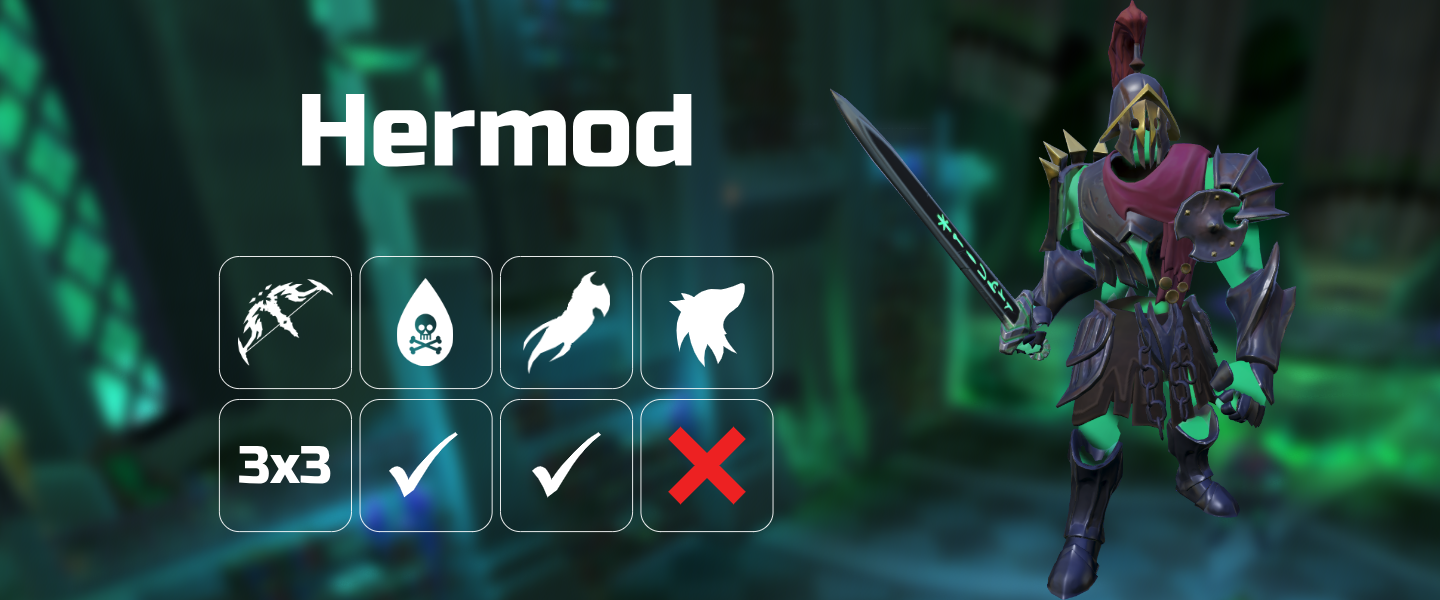
⬥ Key information about banners:
• They are sized with the ratio 12w x 5h and a minimum of 300px in height
• They have the following components:
⬩ A blurry background representing the arena/area the monster lives in
⬩ The name picture of the monster
⬩ The monster's size (2x2, 5x5 etc)
⬩ Whether poison can be used
⬩ Which weapon the monster is vulnerable to
⬩ Whether familiar damage can be used
Instructions for manual banner creation
⬥ In some situations (for example, the entire the entire internet falls to robots) you may need to create banners manually
⬥ Manual creation will work in any app that supports transparency, for example:
• Photoshop
• Gravit.io
• PowerPoint
• Paint.net
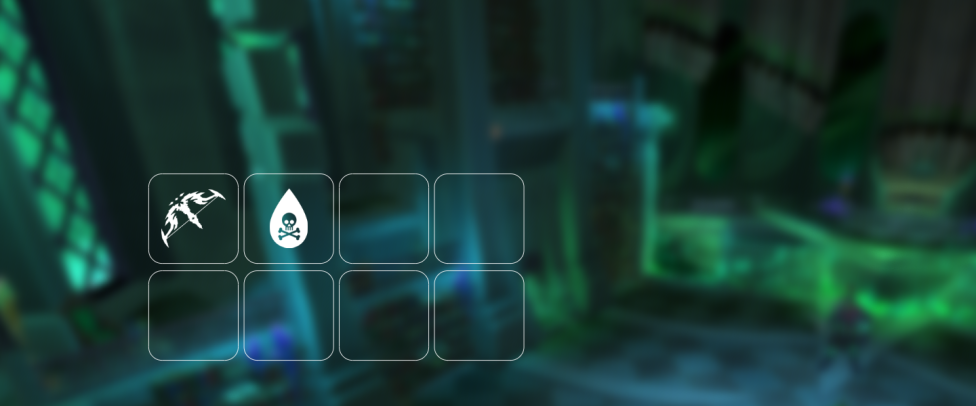
Step 1: Create a blurry background and add the boxes
- Save this template file to your machine and open it in your chosen editor

a. Note: If using PowerPoint, unlock aspect ratio to fix pixel dimensions, then type the pixel value into the boxes that say "cm/inch" (e.g. "1440px")
- In-game, visit the monster's area and use the Freecam or Orb of oculus to find a nice backdrop for your banner
a. Note: A darker environment skybox will usually make the banner look cleaner - experiment!
-
Screenshot the chosen area, and copy the image into your editor
-
Re-order your objects so the background is behind/under the template you started with
-
Crop the background image to the same size as the template
-
Add a strong blur effect to the background image so you can still see the general vibe of the area but not the details
a. Note: If using PowerPoint, right-click image → Picture corrections → Sharpness (-70 to -90%)
Good job! You should now have a banner that looks something like below:
Step 2: Add the monster's name and image
-
Download the Russo One font and install it to your machine
-
Open and copy this guide layer into your editor
-
Staying within the red lines, add a text box (start with font size 102px) and enter the boss' name

a. Note: If the monster has a long name, reducing the font-size is okay as long as it stays within the red lines
b. Note: If using PowerPoint, you will need to eyeball the font-size rather than use pixel font-sizes
-
Centre the boss' name horizontally in the middle of the white boxes (it should be off-centre to the left)
-
Get the image of the monster from the Runescape Wiki:
a. Open the Runescape Wiki, navigate to the monster's page
b. Click on the main image - it should maximise the image file
c. Right-click download this image
d. Import it into your editor (note: this is an important step in some editors, as copying sometimes loses the transparent background)
-
Move the monster's image to the empty space on the right, and resize as appropriate
-
You can now safely hide or delete the red guide layer
Good job! You should now have a banner that looks something like below:
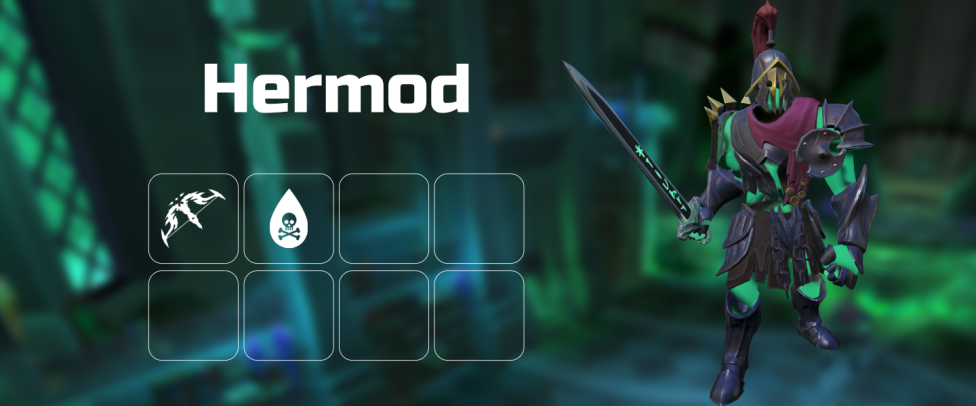
Step 3: Add the summary boxes
- Now comes the fiddly part! Copy in the relevant icons from the below list to the remaining white boxes, ensuring they are centred within their box.
a. Note: The only non-icon box is the bottom-left, where you will need to use the same font as before to type in the boss' size (start with font size 53px)
b. Note: You should be able find the boss' size in a table on the Seren godbow Wiki page
c. Note: If using PowerPoint, the align tools are under "Arrange"
⬥ Icons (download or copy these into the editor as required):
• Box 3 - Inquisitor Staff

• Box 3 - Hexhunter Bow

• Box 3 - Terrasaur Maul

• Box 3 - Omni guard

• Box 4 - Familiar

• Tick

• Cross

Good job! You should now have a finished banner that looks something like below: