Templates & Tips for Writing Guides
imported>PvME corpus import Attributed pinned PvME snapshot 074a9438f79d10fba75735791be0030734db8b5e; CC BY-NC-SA 4.0 |
AI-assisted additive formatting; current PvME source words, order and media preserved |
||
| Line 1: | Line 1: | ||
__NOTOC__ | |||
<div class="pvme-exact-guide"> | |||
< | <h1 id="templates-tips-for-writing-guides" class="pvme-source-title"><ins><nowiki>Templates & Tips for Writing Guides</nowiki></ins></h1> | ||
<nowiki> | <nowiki> | ||
</nowiki><p><nowiki> | </nowiki> | ||
<p class="pvme-source-line"><nowiki>This channel showcases many of the ways you can be more efficient when writing guides, whether that be through copy-able templates, code snippets or other tips.</nowiki></p> | |||
<nowiki> | <nowiki> | ||
</nowiki><p | </nowiki> | ||
<p class="pvme-source-line pvme-source-spacer"><nowiki></nowiki></p> | |||
<nowiki> | <nowiki> | ||
</nowiki><p><nowiki> | </nowiki> | ||
<p class="pvme-source-line"><strong><nowiki>It assumes you are using the </nowiki>[https://pvme.github.io/guide-editor/ <nowiki>PvME Guide Editor</nowiki>]<nowiki> to write & live preview your guides.</nowiki></strong></p> | |||
<nowiki> | <nowiki> | ||
</nowiki>< | </nowiki> | ||
<p class="pvme-source-line pvme-source-spacer"><nowiki></nowiki></p> | |||
<nowiki> | <nowiki> | ||
</nowiki>< | </nowiki> | ||
<div class="pvme-source-section"> | |||
<h2 id="finding-and-using-templates"><ins><nowiki>Finding and using Templates</nowiki></ins></h2> | |||
<nowiki> | <nowiki> | ||
</nowiki><p><nowiki> | </nowiki> | ||
<p class="pvme-source-line"><nowiki>In the Guide Editor toolbar you will see a "Template" dropdown, containing starting points for our main guide types:</nowiki></p> | |||
<nowiki> | <nowiki> | ||
</nowiki><p><nowiki>⬥ | </nowiki> | ||
<p class="pvme-source-line"><nowiki>⬥ Boss Guide</nowiki></p> | |||
<nowiki> | <nowiki> | ||
</nowiki><p><nowiki>⬥ | </nowiki> | ||
<p class="pvme-source-line"><nowiki>⬥ AFK Guide</nowiki></p> | |||
<nowiki> | <nowiki> | ||
</nowiki><p><nowiki>⬥ | </nowiki> | ||
<p class="pvme-source-line"><nowiki>⬥ Slayer Guide</nowiki></p> | |||
<nowiki> | <nowiki> | ||
</nowiki><p><nowiki> | </nowiki> | ||
<p class="pvme-source-line"><nowiki>⬥ Command Embed</nowiki></p> | |||
<nowiki> | <nowiki> | ||
</nowiki><p><nowiki> | </nowiki> | ||
<p class="pvme-source-line pvme-source-spacer"><nowiki></nowiki></p> | |||
<nowiki> | <nowiki> | ||
</nowiki><p> | </nowiki> | ||
<p class="pvme-source-line"><nowiki>Simply click "copy" and paste these into the editor to get started on your guide, as in the screenshot below:</nowiki></p> | |||
<nowiki> | |||
</nowiki> | |||
<p class="pvme-source-line"><pvme-image src="https://img.pvme.io/images/ArqoW60TuE.png" alt="" title="" kind="media" /><nowiki> | |||
</nowiki></p> | </nowiki></p> | ||
<nowiki> | <nowiki> | ||
</nowiki><h2 id="finding-emojis"><ins><nowiki>Finding emojis</nowiki></ins></h2> | </nowiki> | ||
</div> | |||
<div class="pvme-source-section"> | |||
<h2 id="finding-emojis"><ins><nowiki>Finding emojis</nowiki></ins></h2> | |||
<nowiki> | <nowiki> | ||
</nowiki><p><nowiki>There are two ways to find an emoji:</nowiki></p> | </nowiki> | ||
<p class="pvme-source-line"><nowiki>There are two ways to find an emoji:</nowiki></p> | |||
<nowiki> | <nowiki> | ||
</nowiki><ol><nowiki> | </nowiki> | ||
<ol><nowiki> | |||
</nowiki><li><nowiki> | </nowiki><li><nowiki> | ||
</nowiki><p><nowiki>In the Guide Editor, simply start typing </nowiki><code><nowiki>:emojiname</nowiki></code><nowiki> and it will bring up a list - select the one you want</nowiki></p> | </nowiki><p class="pvme-source-line"><nowiki>In the Guide Editor, simply start typing </nowiki><code><nowiki>:emojiname</nowiki></code><nowiki> and it will bring up a list - select the one you want</nowiki></p><nowiki> | ||
<nowiki> | |||
</nowiki></li><nowiki> | </nowiki></li><nowiki> | ||
</nowiki><li><nowiki> | </nowiki><li><nowiki> | ||
</nowiki><p><nowiki>Search the full repository of emojis at </nowiki>[https://pvme.io/pvme-settings/#emojis <nowiki>https://pvme.io/pvme-settings/#emojis</nowiki>]</p> | </nowiki><p class="pvme-source-line"><nowiki>Search the full repository of emojis at </nowiki>[https://pvme.io/pvme-settings/#emojis <nowiki>https://pvme.io/pvme-settings/#emojis</nowiki>]</p><nowiki> | ||
<nowiki> | |||
</nowiki></li><nowiki> | </nowiki></li><nowiki> | ||
</nowiki></ol> | </nowiki></ol> | ||
<nowiki> | <nowiki> | ||
</nowiki><p><nowiki></nowiki></p> | </nowiki> | ||
<p class="pvme-source-line pvme-source-spacer"><nowiki></nowiki></p> | |||
<nowiki> | <nowiki> | ||
</nowiki><h2 id="linking-items-to-the-wiki"><ins><nowiki>Linking items to the Wiki</nowiki></ins></h2> | </nowiki> | ||
</div> | |||
<div class="pvme-source-section"> | |||
<h2 id="linking-items-to-the-wiki"><ins><nowiki>Linking items to the Wiki</nowiki></ins></h2> | |||
<nowiki> | <nowiki> | ||
</nowiki><p><nowiki>Many of our guides link items and gear to the </nowiki>[https://runescape.wiki/ <nowiki>RS Wiki</nowiki>]<nowiki>. Follow these steps:</nowiki></p> | </nowiki> | ||
<p class="pvme-source-line"><nowiki>Many of our guides link items and gear to the </nowiki>[https://runescape.wiki/ <nowiki>RS Wiki</nowiki>]<nowiki>. Follow these steps:</nowiki></p> | |||
<nowiki> | <nowiki> | ||
</nowiki><p><nowiki>⬥ Use the pattern: </nowiki><code><nowiki>[Item name](<http://runescape.wiki/w/Item_name>) <:emoji:></nowiki></code><nowiki></nowiki></p> | </nowiki> | ||
<p class="pvme-source-line"><nowiki>⬥ Use the pattern: </nowiki><code><nowiki>[Item name](<http://runescape.wiki/w/Item_name>) <:emoji:></nowiki></code><nowiki></nowiki></p> | |||
<nowiki> | <nowiki> | ||
</nowiki><p><nowiki> • Wrap the URL in </nowiki><code><nowiki><></nowiki></code><nowiki> to prevent it showing a preview</nowiki></p> | </nowiki> | ||
<p class="pvme-source-line pvme-source-detail"><nowiki> • Wrap the URL in </nowiki><code><nowiki><></nowiki></code><nowiki> to prevent it showing a preview</nowiki></p> | |||
<nowiki> | <nowiki> | ||
</nowiki><p><nowiki> • Most items only capitalise the first word</nowiki></p> | </nowiki> | ||
<p class="pvme-source-line pvme-source-detail"><nowiki> • Most items only capitalise the first word</nowiki></p> | |||
<nowiki> | <nowiki> | ||
</nowiki><p><nowiki> • Replace spaces with underscores</nowiki></p> | </nowiki> | ||
<p class="pvme-source-line pvme-source-detail"><nowiki> • Replace spaces with underscores</nowiki></p> | |||
<nowiki> | <nowiki> | ||
</nowiki><p><nowiki>⬥ Test your URL in the guide editor by clicking on it</nowiki></p> | </nowiki> | ||
<p class="pvme-source-line"><nowiki>⬥ Test your URL in the guide editor by clicking on it</nowiki></p> | |||
<nowiki> | <nowiki> | ||
</nowiki><p><nowiki></nowiki></p> | </nowiki> | ||
<p class="pvme-source-line pvme-source-spacer"><nowiki></nowiki></p> | |||
<nowiki> | <nowiki> | ||
</nowiki><p><nowiki>See the following example:</nowiki></p> | </nowiki> | ||
<p class="pvme-source-line"><nowiki>See the following example:</nowiki></p> | |||
<nowiki> | <nowiki> | ||
</nowiki><p><nowiki></nowiki><code><nowiki>[Channeller's ring](<http://runescape.wiki/w/Channeller's_ring>) <:channellersring:839903943404027914></nowiki></code><nowiki></nowiki></p> | </nowiki> | ||
<p class="pvme-source-line"><nowiki></nowiki><code><nowiki>[Channeller's ring](<http://runescape.wiki/w/Channeller's_ring>) <:channellersring:839903943404027914></nowiki></code><nowiki></nowiki></p> | |||
<nowiki> | <nowiki> | ||
</nowiki><p><nowiki>→ </nowiki>[http://runescape.wiki/w/Channeller's_ring <nowiki>Channeller's ring</nowiki>]<nowiki> </nowiki> | </nowiki> | ||
<p class="pvme-source-line pvme-source-sequence"><nowiki>→ </nowiki>[http://runescape.wiki/w/Channeller's_ring <nowiki>Channeller's ring</nowiki>]<nowiki> </nowiki><pvme-image src="https://cdn.discordapp.com/emojis/839903943404027914.png?v=1" alt="channellersring" title="channellersring" kind="icon" /></p> | |||
<nowiki> | <nowiki> | ||
</nowiki><p><nowiki></nowiki></p> | </nowiki> | ||
<p class="pvme-source-line pvme-source-spacer"><nowiki></nowiki></p> | |||
<nowiki> | <nowiki> | ||
</nowiki><h2 id="using-embeds"><ins><nowiki>Using Embeds</nowiki></ins></h2> | </nowiki> | ||
</div> | |||
<div class="pvme-source-section"> | |||
<h2 id="using-embeds"><ins><nowiki>Using Embeds</nowiki></ins></h2> | |||
<nowiki> | <nowiki> | ||
</nowiki><p><nowiki>Sometimes we use a special Discord "embed" to format messages in a pretty way - these are written in JSON. When inside a JSON, common punctuation like bullets or new lines will not work as normal; use the following to achieve what you are looking for:</nowiki></p> | </nowiki> | ||
<p class="pvme-source-line"><nowiki>Sometimes we use a special Discord "embed" to format messages in a pretty way - these are written in JSON. When inside a JSON, common punctuation like bullets or new lines will not work as normal; use the following to achieve what you are looking for:</nowiki></p> | |||
<nowiki> | <nowiki> | ||
</nowiki><p><nowiki></nowiki></p> | </nowiki> | ||
<p class="pvme-source-line pvme-source-spacer"><nowiki></nowiki></p> | |||
<nowiki> | <nowiki> | ||
</nowiki><p><nowiki>⬥ </nowiki><strong><code><nowiki>\n</nowiki></code></strong><nowiki> → adds a new line</nowiki></p> | </nowiki> | ||
<p class="pvme-source-line pvme-source-sequence"><nowiki>⬥ </nowiki><strong><code><nowiki>\n</nowiki></code></strong><nowiki> → adds a new line</nowiki></p> | |||
<nowiki> | <nowiki> | ||
</nowiki><p><nowiki>⬥ </nowiki><strong><code><nowiki>\u00a0\u00a0\u00a0\u00a0</nowiki></code></strong><nowiki> = adds a new line + 4 spaces</nowiki></p> | </nowiki> | ||
<p class="pvme-source-line"><nowiki>⬥ </nowiki><strong><code><nowiki>\u00a0\u00a0\u00a0\u00a0</nowiki></code></strong><nowiki> = adds a new line + 4 spaces</nowiki></p> | |||
<nowiki> | <nowiki> | ||
</nowiki><p><nowiki>⬥ </nowiki><strong><code><nowiki>\n⬥</nowiki></code></strong><nowiki> → adds a new line + a bullet</nowiki></p> | </nowiki> | ||
<p class="pvme-source-line pvme-source-sequence"><nowiki>⬥ </nowiki><strong><code><nowiki>\n⬥</nowiki></code></strong><nowiki> → adds a new line + a bullet</nowiki></p> | |||
<nowiki> | <nowiki> | ||
</nowiki><p><nowiki>⬥ </nowiki><strong><code><nowiki>\n\u00a0\u00a0\u00a0\u00a0•</nowiki></code></strong><nowiki> → adds a new line + 4 spaces + a sub-bullet</nowiki></p> | </nowiki> | ||
<p class="pvme-source-line pvme-source-sequence"><nowiki>⬥ </nowiki><strong><code><nowiki>\n\u00a0\u00a0\u00a0\u00a0•</nowiki></code></strong><nowiki> → adds a new line + 4 spaces + a sub-bullet</nowiki></p> | |||
<nowiki> | <nowiki> | ||
</nowiki><p><nowiki>⬥ </nowiki><strong><code><nowiki>\n\u200B</nowiki></code></strong><nowiki> → adds a blank line</nowiki></p> | </nowiki> | ||
<p class="pvme-source-line pvme-source-sequence"><nowiki>⬥ </nowiki><strong><code><nowiki>\n\u200B</nowiki></code></strong><nowiki> → adds a blank line</nowiki></p> | |||
<nowiki> | <nowiki> | ||
</nowiki><p><nowiki></nowiki></p> | </nowiki> | ||
<p class="pvme-source-line pvme-source-spacer"><nowiki></nowiki></p> | |||
<nowiki> | <nowiki> | ||
</nowiki><p><nowiki>A example embed can be seen below:</nowiki></p> | </nowiki> | ||
<p class="pvme-source-line"><nowiki>A example embed can be seen below:</nowiki></p> | |||
<nowiki> | <nowiki> | ||
</nowiki><p><nowiki></nowiki></p> | </nowiki> | ||
<p class="pvme-source-line pvme-source-spacer"><nowiki></nowiki></p> | |||
<nowiki> | <nowiki> | ||
</nowiki><pre>.. | </nowiki> | ||
<pre>.. | |||
{ | { | ||
"embed": { | "embed": { | ||
| Line 112: | Line 164: | ||
</pre> | </pre> | ||
<nowiki> | <nowiki> | ||
</nowiki><p><nowiki></nowiki></p> | </nowiki> | ||
<p class="pvme-source-line pvme-source-spacer"><nowiki></nowiki></p> | |||
<nowiki> | <nowiki> | ||
</nowiki><p><nowiki>When rendered, the above code looks like the following;</nowiki></p> | </nowiki> | ||
<p class="pvme-source-line"><nowiki>When rendered, the above code looks like the following;</nowiki></p> | |||
<nowiki> | <nowiki> | ||
</nowiki><div><nowiki> | </nowiki> | ||
<div><nowiki> | |||
</nowiki><div><nowiki> | </nowiki><div><nowiki> | ||
</nowiki><div><nowiki> | </nowiki><div><nowiki> | ||
| Line 128: | Line 183: | ||
</nowiki><div><nowiki> | </nowiki><div><nowiki> | ||
</nowiki><div></div> | </nowiki><div style="background-color: rgb(0, 153, 255)"></div><nowiki> | ||
<nowiki> | |||
</nowiki><div><nowiki> | </nowiki><div><nowiki> | ||
</nowiki><div><nowiki> | </nowiki><div><nowiki> | ||
</nowiki><div><nowiki> | </nowiki><div><nowiki> | ||
</nowiki><div | </nowiki><div><u><nowiki>[embed title]</nowiki></u><nowiki> | ||
</nowiki></div> | </nowiki></div><nowiki> | ||
<nowiki> | </nowiki><div class="pvme-source-preserve-lines"><nowiki>[embed description] | ||
</nowiki><div | |||
| | ||
</nowiki></div> | </nowiki></div><nowiki> | ||
<nowiki> | |||
</nowiki><div><div><div><u><nowiki>[field 1 name]</nowiki></u><nowiki> | </nowiki><div><div><div><u><nowiki>[field 1 name]</nowiki></u><nowiki> | ||
</nowiki></div> | </nowiki></div><div class="pvme-source-preserve-lines"><nowiki>[field 1 contents] | ||
<div | </nowiki></div></div><div><div><u><nowiki>[field 2 name]</nowiki></u><nowiki> | ||
</nowiki></div> | </nowiki></div><div class="pvme-source-preserve-lines"><nowiki>⬥ Field 2 contents | ||
</div> | |||
<div><div><u><nowiki>[field 2 name]</nowiki></u><nowiki> | |||
</nowiki></div> | |||
<div | |||
⬥ Field 2 contents | ⬥ Field 2 contents | ||
</nowiki></div> | </nowiki></div></div></div><nowiki> | ||
</div> | </nowiki></div><nowiki> | ||
</div> | |||
<nowiki> | |||
</nowiki></div> | |||
<nowiki> | |||
</nowiki></div> | </nowiki></div><nowiki> | ||
<nowiki> | |||
</nowiki></div> | </nowiki></div></div></div></div></div></div></div></div></div></div></div></div> | ||
</div> | |||
</div> | |||
</div> | |||
</div> | |||
</div> | |||
</div> | |||
</div> | |||
</div> | |||
</div> | |||
</div> | |||
</div> | |||
<nowiki> | <nowiki> | ||
</nowiki><p><nowiki></nowiki></p> | </nowiki> | ||
<p class="pvme-source-line pvme-source-spacer"><nowiki></nowiki></p> | |||
<nowiki> | <nowiki> | ||
</nowiki> | </nowiki> | ||
</div> | |||
</div> | |||
<div class="pvme-source-attribution">[https://pvme.io/pvme-guides/editor-resources/editor-references/templates/ PvME source] · PvME contributors · [https://creativecommons.org/licenses/by-nc-sa/4.0/ CC BY-NC-SA 4.0]. AI-assisted formatting; source wording retained. | |||
</div> | |||
Revision as of 00:55, 16 November 2026
Templates & Tips for Writing Guides
This channel showcases many of the ways you can be more efficient when writing guides, whether that be through copy-able templates, code snippets or other tips.
It assumes you are using the PvME Guide Editor to write & live preview your guides.
Finding and using Templates
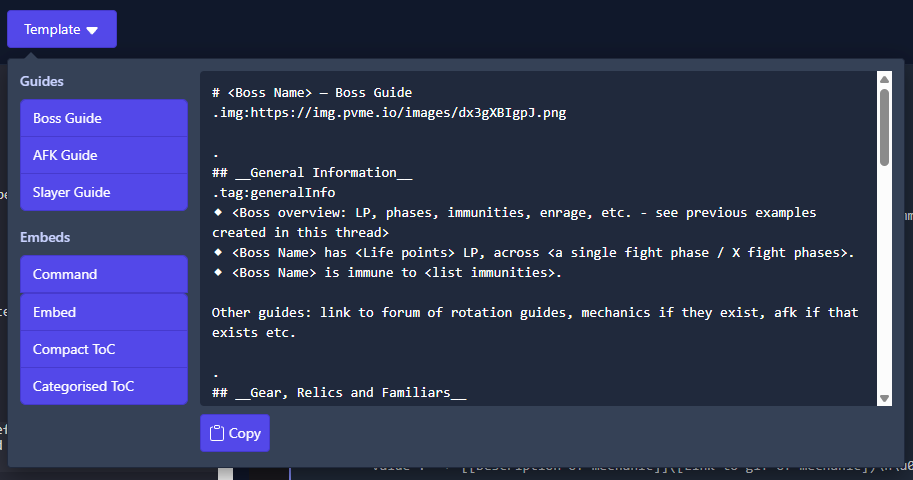
In the Guide Editor toolbar you will see a "Template" dropdown, containing starting points for our main guide types:
⬥ Boss Guide
⬥ AFK Guide
⬥ Slayer Guide
⬥ Command Embed
Simply click "copy" and paste these into the editor to get started on your guide, as in the screenshot below:
Finding emojis
There are two ways to find an emoji:
-
In the Guide Editor, simply start typing
:emojinameand it will bring up a list - select the one you want -
Search the full repository of emojis at https://pvme.io/pvme-settings/#emojis
Linking items to the Wiki
Many of our guides link items and gear to the RS Wiki. Follow these steps:
⬥ Use the pattern: [Item name](<http://runescape.wiki/w/Item_name>) <:emoji:>
• Wrap the URL in <> to prevent it showing a preview
• Most items only capitalise the first word
• Replace spaces with underscores
⬥ Test your URL in the guide editor by clicking on it
See the following example:
[Channeller's ring](<http://runescape.wiki/w/Channeller's_ring>) <:channellersring:839903943404027914>

Using Embeds
Sometimes we use a special Discord "embed" to format messages in a pretty way - these are written in JSON. When inside a JSON, common punctuation like bullets or new lines will not work as normal; use the following to achieve what you are looking for:
⬥ \n → adds a new line
⬥ \u00a0\u00a0\u00a0\u00a0 = adds a new line + 4 spaces
⬥ \n⬥ → adds a new line + a bullet
⬥ \n\u00a0\u00a0\u00a0\u00a0• → adds a new line + 4 spaces + a sub-bullet
⬥ \n\u200B → adds a blank line
A example embed can be seen below:
..
{
  "embed": {
    "title": "__[embed title]__",
    "description": "[embed description]\n\u200B",
    "color": 39423,
    "fields": [
      {
        "name": "__[field 1 name]__",
        "value": "[field 1 contents]"
      },
      {
        "name": "__[field 2 name]__",
        "value": "⬥ Field 2 contents\n⬥ Field 2 contents"
      }
    ]
  }
}
..embed:json
When rendered, the above code looks like the following;