Ability Bar Builder
Introduction
⬥ Some guides require sharing an action bar to go alongside them, but it can be difficult to make in-game if you don't have spare action bars, or if you don't have the required abilities to do so unlocked.
⬥ A couple of tools have been developed that make this process easier.
Ability Bar Builder
⬥ Try it here: https://pvme.github.io/ability-bar-builder/
Guide illustration
⬥ This tool (created by Contributor name unavailable) allows you to quickly create custom revolution bars that you can then take screenshots of, or directly export as .png.
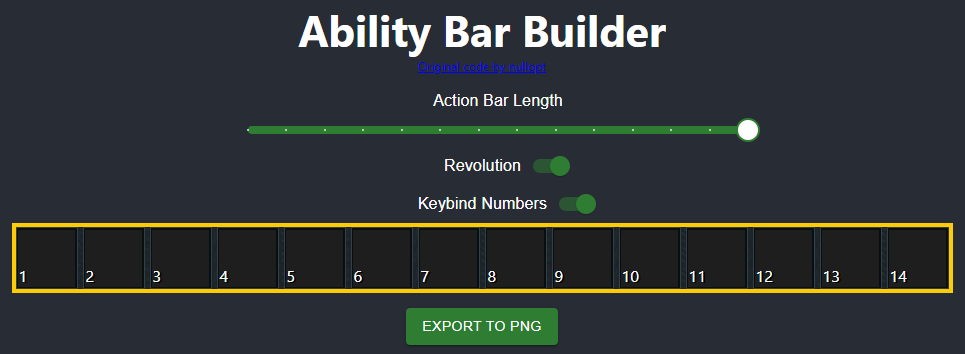
• You can then send it to Guide media upload and request (external Discord) to get a image link to use in guides generated.
⬥ To use it, simply click on an ability bar slot and choose an ability to go there.
⬥ You can use the toggles above to change the bar length, toggle the yellow outline on/off, and remove the white number icons.
Revo Bar Tool
Note: This tool may sometimes be down (towards the end of a month), due to excessive traffic.
⬥ Try it here: https://revocalc.fly.dev/
Guide illustration ⬥ This tool was created by Contributor name unavailable and allows you to create custom revolution bars, similar to the Ability Bar Builder.
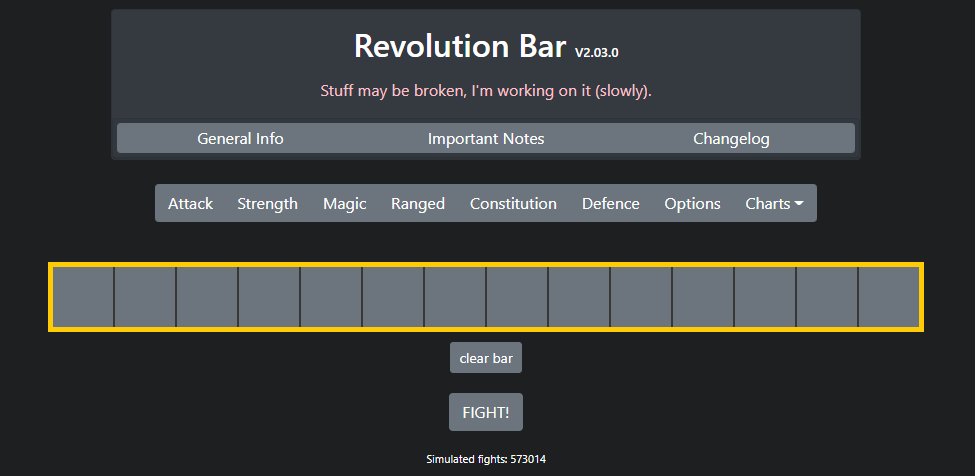
⬥ To use it, drag and drop abilities from the menus above into the bar. To clear a slot on the bar, simply drag out the ability from it.
⬥ You can also simulate using the revolution bar in combat, to compare its long-term sustained DPS with other bars.
Attribution and source history
Adapted from Ability Bar Builder by PvME contributors. Upstream source history. Licensed CC BY-NC-SA 4.0. Snapshot 074a9438f79d10fba75735791be0030734db8b5e. Formatting adapted for standalone MediaWiki; media and third-party references remain external links.